⚡ Zero-copy GPU capture 👁️ Sees occluded windows 🖥️ Across workspaces 🦀 Rust 🪟 Wayland-native 🎨 Themeable 🌍 13 languages
Five tools for wlroots and derivatives.
Pick · switch · capture · inspect · draw.
Name a window — even one you can't see. Screenshot, record, mirror, OCR or watch any window by app id or title, occluded behind others or parked on another workspace. No clicking, no workspace-hopping — and it scripts.
Source on GitHub Compatibility
wlr-chooser — pick a window or screen
Share the right window. A rofi-like picker with live thumbnails for the
screencast portal — pick from live previews, not a text list. It also answers to
scripts: --layout grid --hints for one keystroke per window, --format json for
the app id, title and pid of what you picked.
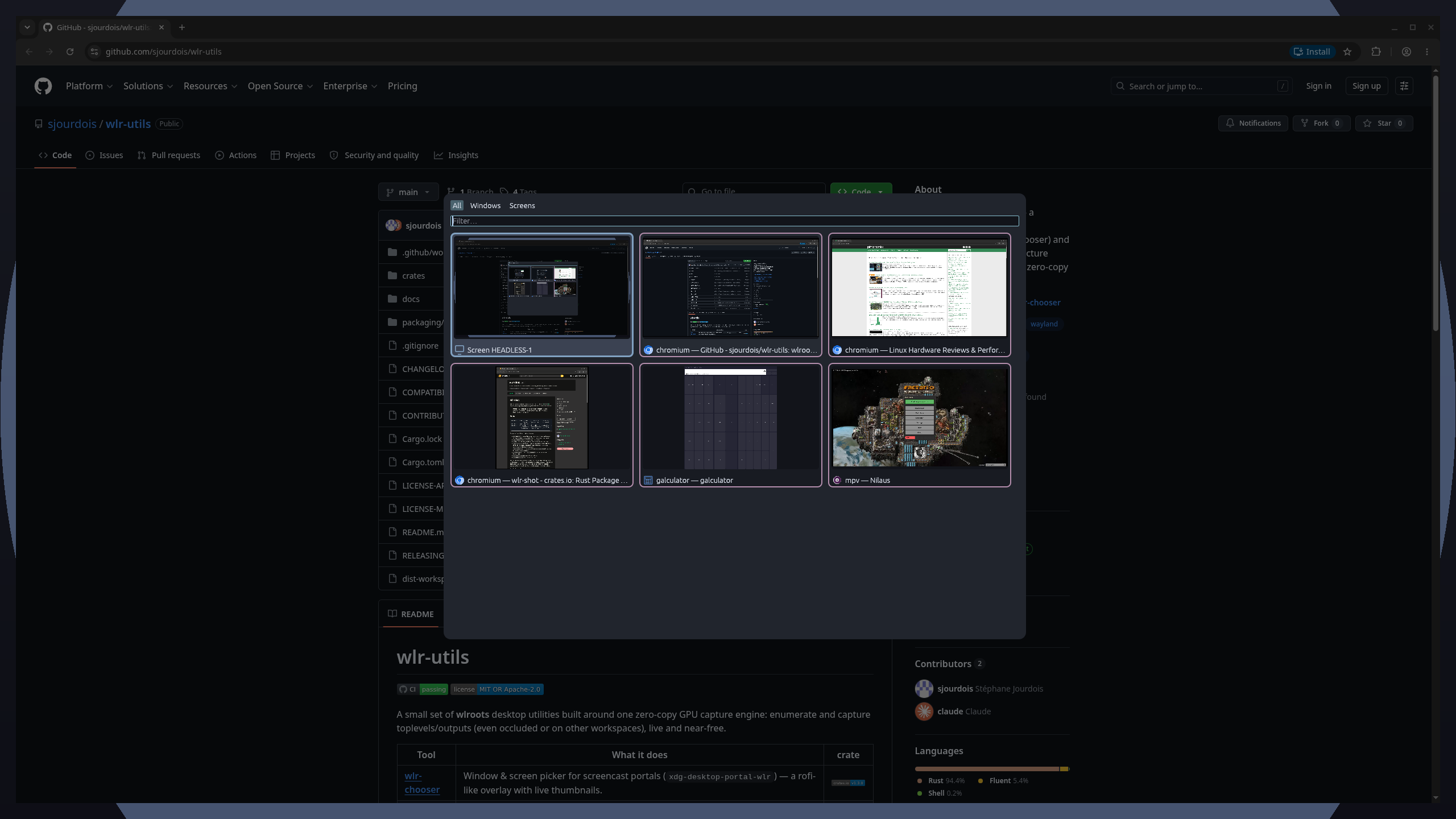
wlr-switcher — Alt-Tab & exposé with live previews
Alt-Tab with live previews. The exposé reveals windows from other workspaces — even occluded ones. Real moving thumbnails, not icons.
Press a letter to jump straight to a window: the label is whatever your keyboard
layout prints on that key, so it names the key under your finger — a on QWERTY,
q on AZERTY, same position. Narrow the list first with --app-id, --title,
--pid or, on sway, --scratchpad; the windows left out are never captured, and
with hold-to-switch a lone window left is switched to at once.
# A true Alt-Tab: bind it to a held modifier.
bindsym Mod1+Tab exec wlr-switcher
bindsym Mod1+grave exec wlr-switcher --layout grid --hints --app-id foot
# Pull the picked window onto the current workspace.
bindsym Mod1+Control+Tab exec wlr-switcher --move
# sway's scratchpad: one key fetches a window, and puts it back.
bindsym $mod+minus exec wlr-switcher --scratchpad toggle --move --cycle-key Minus:Equal
Start wlr-overlayd with your session — exec wlr-overlayd — and the overlay
appears in about ten milliseconds instead of ninety: the daemon holds the GPU
context both it and wlr-chooser would otherwise rebuild every time. Nothing is
captured while it waits, and neither tool needs a daemon to work.
wlr-shot — capture the screen
Screenshot or record anything. Region, window or whole output → PNG/JPEG, or H.264 / GIF — with system audio and timelapse.
Target a window by name (--app-id/--title) — even hidden, on another
workspace, or behind a lock screen. It grabs the window itself, not the visible
pixels, so there’s no need to raise it first.
Whole-screen grabbers like grim shoot the visible output — so they miss what
isn’t on it: occluded or unmapped windows, overlays, other workspaces.
Below: the frozen region selector.
wlr-shot screenshot -s out.png            # drag a region on a frozen screen
wlr-shot screenshot --app-id firefox out.png   # a window by name — even hidden or locked
wlr-shot record -o DP-1 out.mp4                # video + system audio
wlr-shot record -o DP-1 --crf 18 --cursor out.mp4   # finer encoding, pointer included
wlr-draw — draw live on screen
Scribble over anything. Arrows, shapes, dwell-snap and text on a transparent
always-on-top overlay — plus a presenter spotlight to focus the room. Hold a
freehand stroke still and it snaps to a clean line or ellipse; tune that delay in
keys.toml, switch it off with a key, or hold Alt to invert it for one stroke.
Presenter spotlight — hold Shift to dim everything but a flashlight that follows the cursor, or pose a fixed spotlight on a window:
wlr-draw            # start the daemon
wlr-draw toggle     # toggle draw mode (bind it to a hotkey)
wlr-peek — inspect the screen
Inspect the screen. Colour pipette, magnifier, live picture-in-picture mirror, OCR, visual grep, a change monitor — one tool.
mirror, ocr and watch take --app-id/--title, so they reach a window
even when it’s occluded or off-workspace.
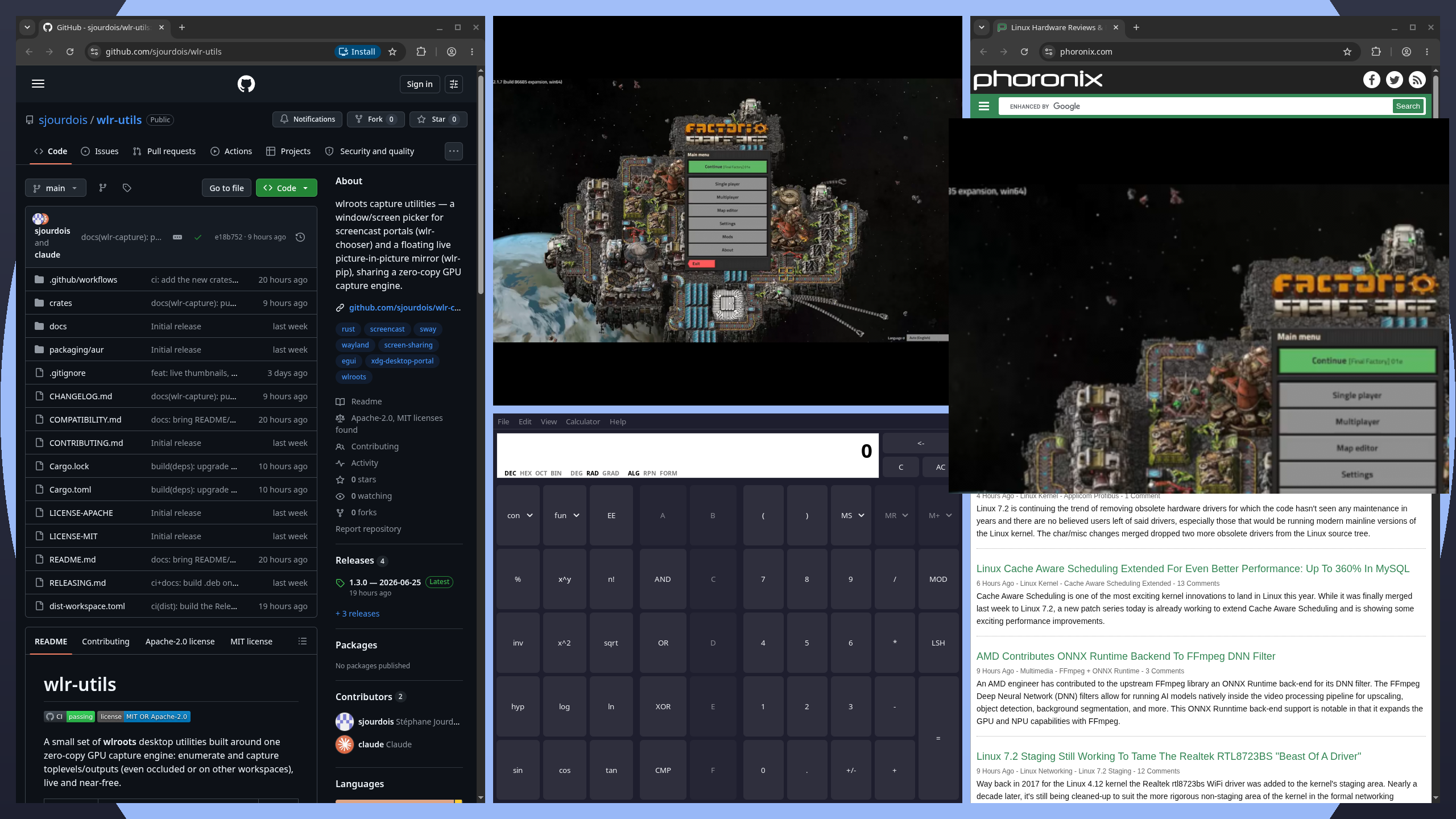
The live mirror (picture-in-picture, zooming a region ×2), and the CLI
subcommands (ocr, watch, …) running against the screen:
wlr-peek color                          # pipette — pick a colour
wlr-peek loupe                          # magnifier — scroll to zoom
wlr-peek mirror --app-id firefox        # live PiP of a window by name — even off-workspace
wlr-peek region                         # slurp replacement — print "X,Y WxH"
wlr-peek ocr --app-id thunderbird       # read a window's text without raising it
wlr-peek grep "feature"                 # visual grep — find on-screen text
wlr-peek watch -o DP-1 --on change      # fire when a region changes
Install
All five tools in one go — the wlr-utils bundle:
cargo install wlr-utils
…or grab the prebuilt bundle
(one archive + a one-line wlr-utils-installer.sh). Prefer a single tool? Install it on
its own — cargo install wlr-shot (also wlr-chooser, wlr-peek, wlr-draw). Uninstall
with cargo uninstall <name>; see the
main README for the leftover files
wlr-draw writes (its autostart entry).
They run on wlroots compositors that implement ext-image-copy-capture-v1
(sway, Hyprland, cosmic-comp, …), and on the screen features alone where
only wlr-screencopy is exposed (niri, and dwl before 0.9). See the
compatibility matrix.
All media on this page is generated reproducibly by
tools/screenshots
in an isolated headless compositor.